
Consent Mode v2 migration for Fintech
@ Gripped — Implemented OneTrust CMP via GTM, ensuring full compliance whilst maintaining accurate conversion tracking
Overview
A B2B fintech's existing OneTrust implementation wasn't integrated with their tag management infrastructure, creating compliance risks and limiting control over cookie consent enforcement. The aim was to get them compliant as quickly as possible, whilst maintaining accurate conversion tracking across Google Analytics, Google Ads, and LinkedIn Ads.
What I delivered
- Full Consent Mode v2 compliance: Migrated the client from a non-compliant, hardcoded implementation to a fully compliant, GTM-native deployment for OneTrust.
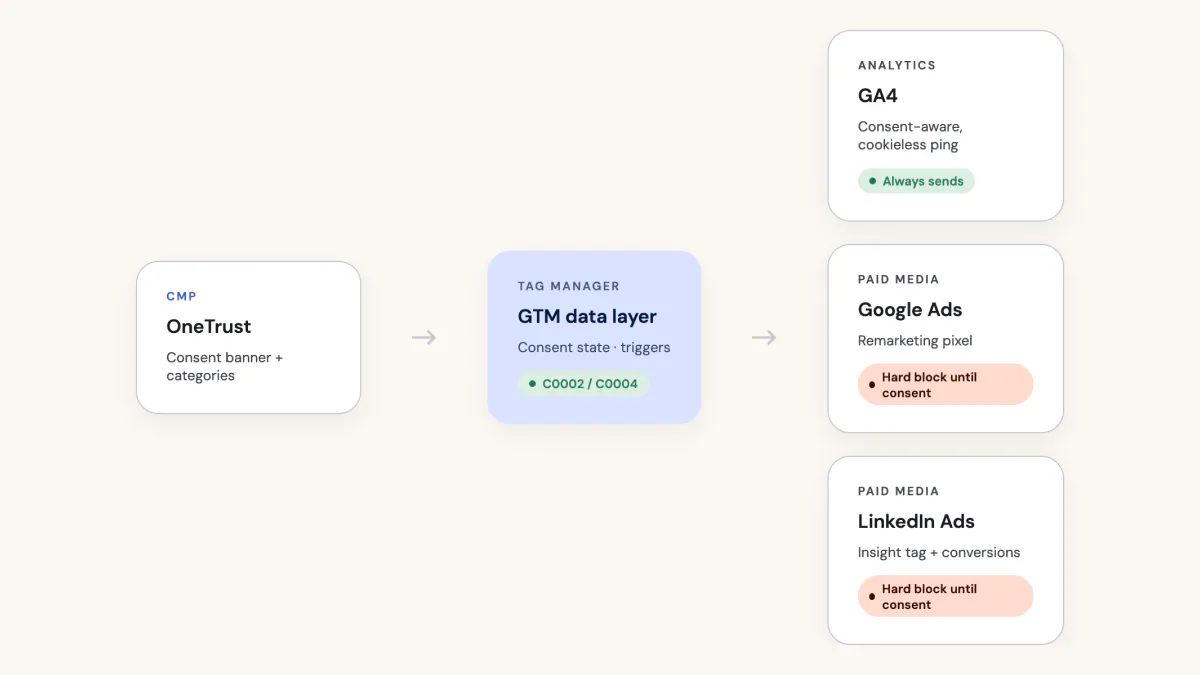
- Consent-aware tracking architecture: Configured consent mode settings across all third-party pixels (LinkedIn, Google Ads) and GA4 event tags, implementing hard blocks for targeting cookies and cookieless ping capabilities for analytics.
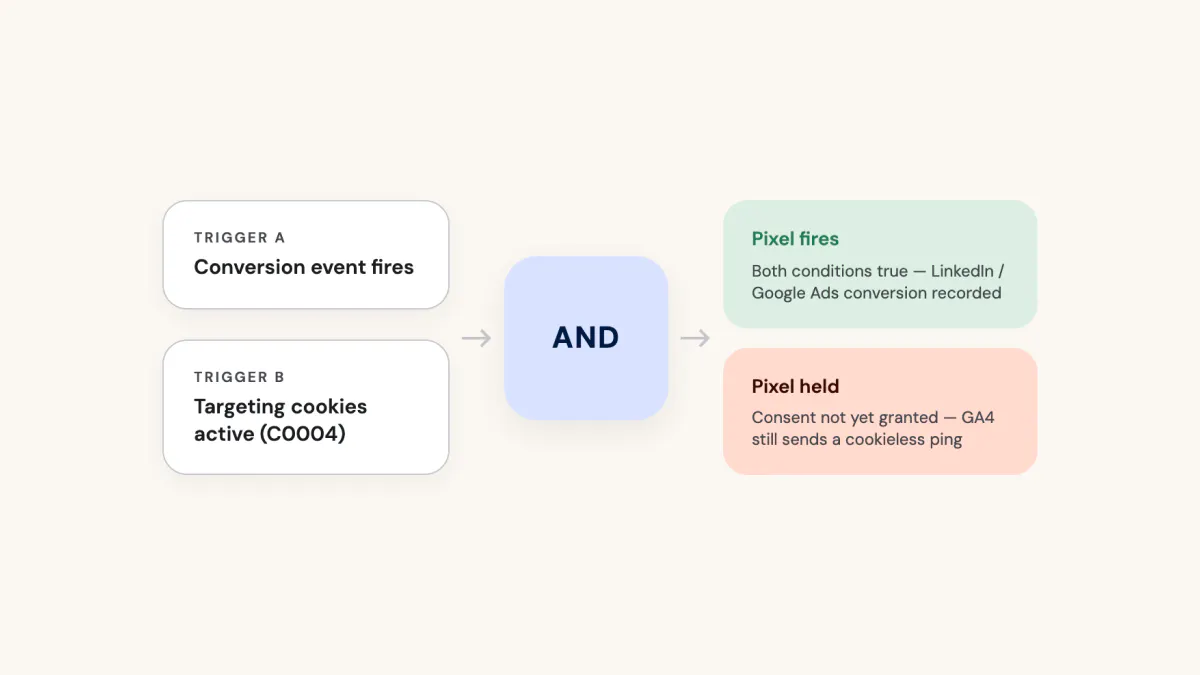
- Systematic triggers: Built trigger groups combining conversion events with consent state checks, ensuring conversion pixels fire only when users have granted targeting cookie consent.
- Scalable documentation system: Created comprehensive documentation for future tag additions with proper consent handling.
Process
Initial Assessment & Planning
I audited the client's existing OneTrust implementation, using a variety of methods including monitoring network requests, analysing source code and checking consent states in GTM debug mode. Very quickly, I identified that the consent banner was hardcoded into the website source code,
Implementations via a hardcoded banner are possible, and can be compliant, but in this instance the banner was not communicating correctly with GTM or the OneTrust platform (where consent groups were managed) itself to maintain consent states. The audit also uncovered that various pixels implemented via GTM were assigned to the wrong consent groups.
Overall, the business’ limited control over consent enforcement meant that marketing cookies were firing even after explicit rejection from users.
Based on OneTrust’s recommendations, and the client’s need for an easily scalable consent solution, I decided that migrating to Consent Mode v2, with the banner controlled via GTM was best way of ensuring compliance going forward.
Solution Design & Implementation
Moving the OneTrust CMP into GTM provided centralised consent management, allowing precise control over which tags fire based on user consent. The distinction between GA4 (which can send cookieless pings) and third-party pixels (which require hard blocks) was critical to preserving data collection whilst respecting user privacy.
OneTrust CMP Migration
Removed the OneTrust banner from the website source code and implemented it via the OneTrust CMP template in GTM.
Created a consent initialisation trigger to fire the CMP on page load.
Built custom event triggers for Performance Cookies (C0002) and Targeting Cookies (C0004) based on OneTrust's active consent groups.
Developed a data layer variable to capture OneTrust consent states dynamically.
GA4 Event Handling
For GA4 event tags, I enabled the analytics_storage consent requirement but maintained standard firing triggers. This approach allowed GA4 to send cookieless pings when full consent wasn't granted whilst still respecting privacy preferences, preserving essential analytics data without creating hard blocks.
Third-Party Pixel and Conversion Event Configuration
I reviewed all existing third-party tracking pixels and GA4 events to map consent requirements for each tag type, ensuring they were consistent with the relevant OneTrust cookie groups.
For non-native tracking pixels (LinkedIn Insight Tag), I created a hard block, preventing pixels from firing until users granted targeting cookie consent. In practice, this meant enabling the ad_storage consent requirement and changing firing triggers from "All Pages" to the custom "Targeting Cookies Active (C0004)" event.
For conversion tags (LinkedIn conversion events), I created trigger groups combining the standard conversion trigger with the Targeting Cookies Active event. This ensured conversion pixels only fired when both conditions were met: the conversion action occurred AND the user had granted targeting cookie consent.
Documentation & Knowledge Transfer
I created user-friendly documentation covering the complete implementation, including step-by-step guides for adding new third-party pixels, conversion events, and GA4 tags with proper consent handling. This knowledge transfer was critical - compliance for marketing analytics is a serious subject, and as a result, there are gaps within internal teams because of the barrier to understanding how it works in practice. Consequently, teams struggle to a.) stay compliant or b.) implement and use new tracking technology to their full potential, because of the lack of expertise.
Need some help with your consent mode implementation?
Set up a no-obligation discovery call to discuss your needs, and I'll build a custom proposal that's right for your startup.